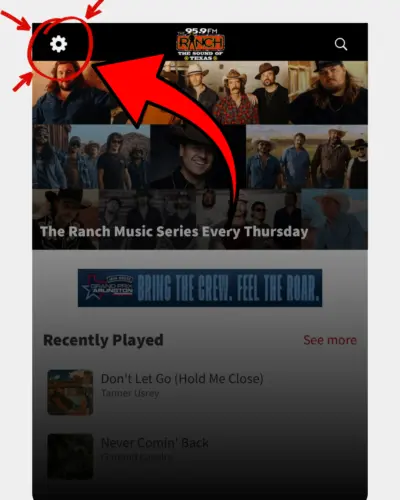
From the home screen of the app, tap the gear icon in the top left corner.
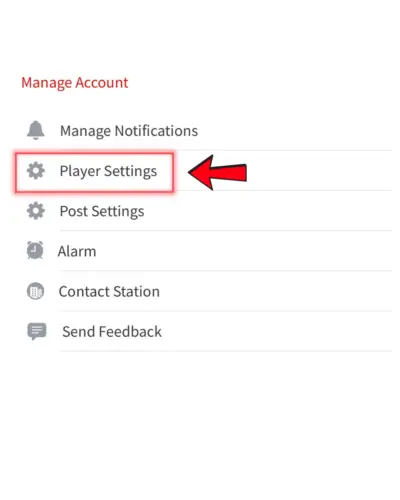
Inside your settings menu, tap “Player Settings.”
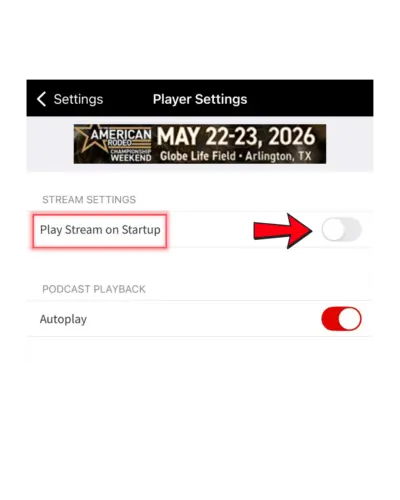
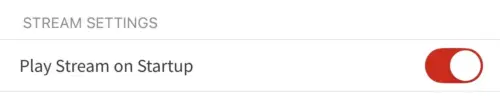
Find the option labeled “Play Stream on Startup” and turn the toggle ON.
Now, every time you open The Ranch app, the live stream will automatically start playing!
Make sure you turn on “Play Stream on Startup” and not just Podcast Autoplay, as they are different settings.
This feature works the same on both iPhone and Android.
The stream will start automatically when you open the app, but it will not play if the app is fully closed in the background.
If you listen often, this is the easiest way to make sure The Ranch is always ready to go the second you open the app.