How to Send Us Content in The Ranch App

app-how-to-2026-send-us-content

Want to connect with The Ranch? You can send us messages, voice recordings, photos, and videos directly from the app.

Whether you’re requesting a song, entering a contest, or just saying hello, we’d love to hear from you.

Step 1: Find the Options on the Home Screen

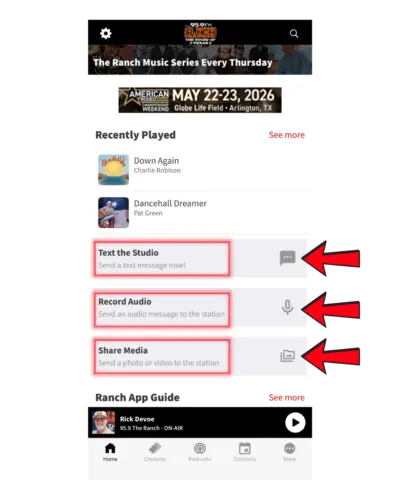
On the home screen, scroll down until you see:

  • Text the Studio
  • Record Audio
  • Share Media

Choose the option that matches what you want to send.

93

Send a Text Message

Tap “Text the Studio” and your phone will open your messaging app.

From there, type your message and send it directly to The Ranch.

Message and data rates may apply.

Send a Voice Message

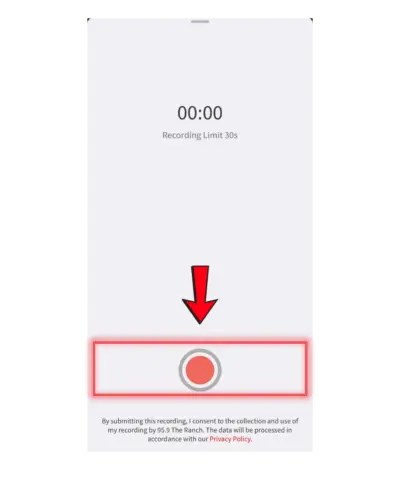
Tap “Record Audio.”

You’ll be taken to a recording screen with a timer and a red record button at the bottom.

  • Tap the record button to start recording
  • Speak your message (up to 30 seconds)
  • Tap again to stop recording
94

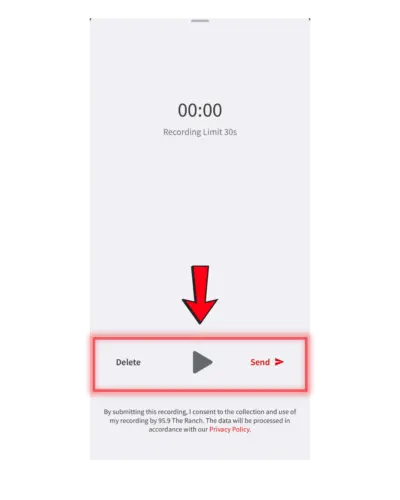
After recording, you’ll see options to:

  • Play your message back
  • Delete and re-record
  • Tap Send to submit it to the station
95

Send Photos

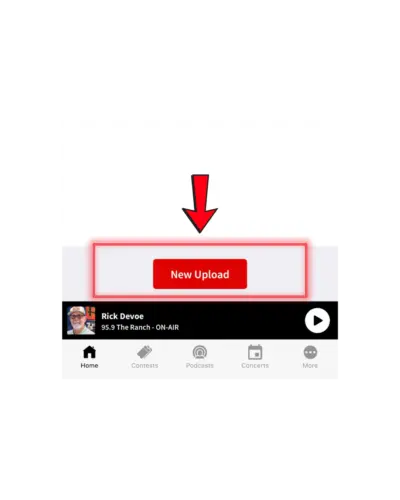
Tap “Share Media.”

Then tap the “New Upload” button to begin.

96

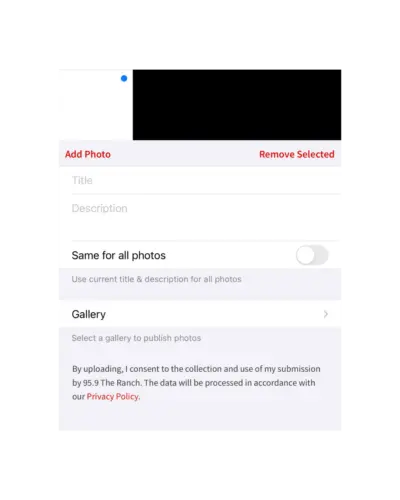
From there, you can:

  • Tap Add Photo to select your image or video
  • Add a title and description (optional but recommended)
  • Choose where to submit your content

Once everything looks good, submit your upload to The Ranch.

97

What These Features Do

These features lets you connect directly with The Ranch, whether you’re:

  • Requesting a song
  • Entering a contest
  • Sending a shoutout
  • Sharing photos or videos


Important Notes

Your phone may ask for access to your microphone or camera, make sure to allow it.

All submissions may be reviewed before being used on-air or in content.

Pro Tip

Watch for app-only contests and callouts! This is how you’ll submit entries and get featured on The Ranch.

Share: Copied!
Related Articles
Loading...